Barangay Buddy App
Designing a clearer digital service experience for barangays — from research to launch-ready product experience.
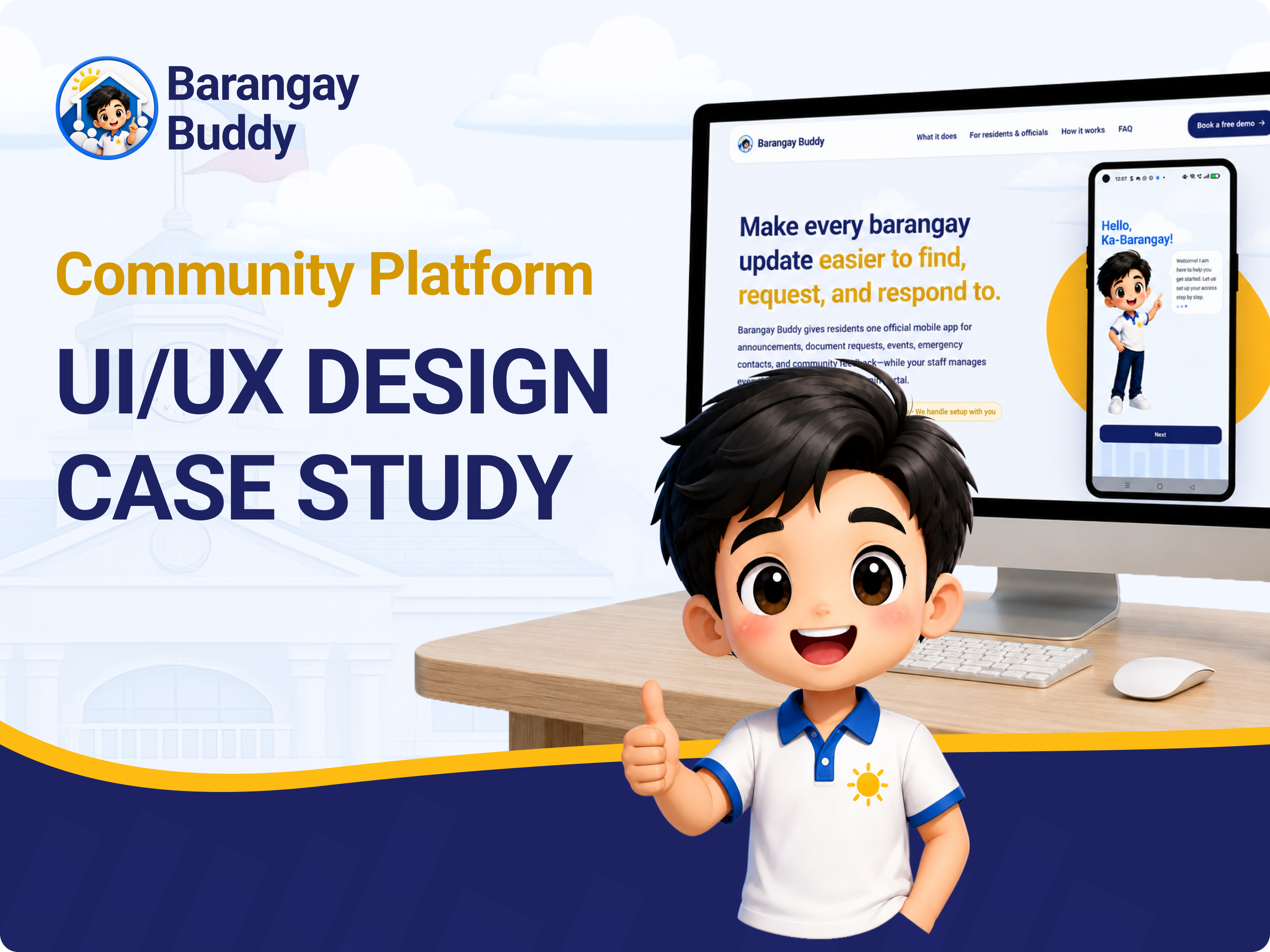
Barangay information is important, but it is often spread across too many channels.
Barangay Buddy was created to give residents and barangay teams one organized digital space for communication and service access. Since the resident app is already available on Google Play, the case study focuses on how the experience was shaped for real adoption, not only as a concept.
Problem Statement
Residents need a trusted and accessible way to find official barangay information, while barangay officials and staff need a simpler system for managing announcements, document requests, contacts, events, and public resources without relying on repeated manual follow-ups.
Possible Solution
Create a connected mobile app and admin portal where residents can check updates, submit requests, access hotlines, join polls, and view public resources, while officials and staff can manage content and requests from one structured workspace.
Residents
Need quick access to announcements, document requests, emergency contacts, events, polls, and public resources through one easy-to-use mobile app.
Barangay Officials & Staff
Need a simple admin system to publish updates, manage requests, organize public information, and communicate with residents more efficiently.
Leading the product experience from problem framing to interface design.
I worked on the product strategy, UX direction, user flow planning, information architecture, wireframing, prototyping, visual design, and UI writing for both the resident app and barangay admin portal.
A human-centered process guided by real barangay needs.
The process focused on understanding actual resident and staff pain points, defining the most important service problems, and designing features that directly support barangay communication and service access.
A clear UX and UI timeline from research to launch-ready design.
This timeline shows how the Barangay Buddy project moved from research and discovery to visual design, usability review, and launch support. The work started by understanding resident and barangay staff needs, then moved into product structure, interface design, validation, and final design preparation.
Research helped us decide what features were actually needed.
Before finalizing the product, surveys and interviews were used to understand how people currently interact with barangay services and how the app could support real daily needs.
The interviews focused on residents’ current habits and barangay teams’ daily work. The goal was to uncover pain points around communication, request handling, and access to important information.
Interview Questions
- How do you usually know about barangay announcements or events?
- What barangay information do you often need to ask for?
- Have you experienced confusion when requesting documents?
- Would a mobile app help you stay updated with barangay services?
- For staff: which tasks take too much time because they are handled manually?
Key Insights
- Residents want one trusted place to check official updates.
- Document request status needs to be easier to follow.
- Emergency contacts and public resources should be easy to find quickly.
- Barangay teams need a cleaner way to manage updates and reduce repeated questions.
Connecting research findings to product decisions.
Every core feature was tied to a user need so the app did not feel like a random collection of tools.
Defining the product around two connected user journeys.
The resident app and admin portal needed to work together. Residents need easy access to information, while officials and staff need a reliable way to manage that information.
A Resident of the Barangay
A resident who wants to stay updated, submit requests, find contacts, and participate in barangay activities without confusion.
A Barangay Team Member
A barangay team member who manages updates, requests, events, contacts, and resources while answering repeated resident questions.
The empathy map shows how residents and barangay teams experience the same service problem from different sides. Residents need easier access to official information and services, while barangay officials and staff need a cleaner way to manage updates, requests, and public communication.
Persona
Says
- “Where can I check the latest barangay announcement?”
- “I want to know if my document request is already approved.”
- “Who should I contact during an emergency?”
Thinks
- “I hope the information I see is official and updated.”
- “It would be easier if I did not have to ask the same question again.”
- “I need a simple way to check services without going to the barangay hall right away.”
Does
- Checks group chats, social media posts, or asks other residents for updates.
- Visits or messages the barangay office to follow up on document requests.
- Looks for emergency numbers only when the need becomes urgent.
Feels
- Confused when updates are scattered across different channels.
- Frustrated when request status is unclear.
- Relieved when information is official, easy to find, and simple to understand.
Persona
Says
- “We need a faster way to post announcements and updates.”
- “Residents often ask the same questions about requests and schedules.”
- “It would help if documents, contacts, and public information were easier to manage.”
Thinks
- “Manual follow-ups take time away from other barangay work.”
- “Residents need clear information, but updates are spread across different channels.”
- “A structured system could help us organize requests and reduce repeated questions.”
Does
- Publishes announcements, schedules, and public information for residents.
- Handles document requests, follow-ups, contacts, and resources manually.
- Answers repeated questions from residents through messages, calls, or in-person visits.
Feels
- Overloaded when information and requests are handled manually.
- Concerned when residents miss important updates.
- More confident when there is one organized portal to manage communication and services.
Barangay Buddy will help residents access official barangay services and information faster by providing one mobile app for updates, requests, contacts, events, and public resources, while giving barangay officials and staff a simple web portal to manage those services.
Organizing features around real barangay tasks.
The feature structure was shaped through brainstorming, card sorting, and user flow mapping. The goal was to group features in a way residents and staff can understand quickly.
Updates
Services
Community
Support
How residents and staff move through the product.
This section shows how residents and barangay teams move through Barangay Buddy. The resident mobile app helps residents access official updates, request documents, check emergency contacts, view events, join polls, and access public resources. The web admin portal helps barangay officials and staff publish content, manage requests, update schedules, organize contacts, and keep resident-facing information accurate.
Resident App
Residents use the mobile app to receive official updates, request documents, check emergency contacts, view events, join polls, and access public resources.
Web Admin Portal
Barangay officials and staff use the admin portal to publish content, manage requests, update schedules, organize contacts, and keep the resident app accurate.
Connected System
The admin portal manages the information. The mobile app makes that information easier for residents to access and act on.
Resident flows focus on giving people a clear path to official information and services. The most common actions are kept simple so residents can complete them without needing help from staff.
This flow helps new residents access the app, choose their barangay, create or enter their account, and land on the correct home dashboard for official updates and services.
The resident app prioritizes quick access to official updates, request tracking, emergency information, and community participation. Each flow is kept short so residents can complete the task without needing help from staff.
Admin flows focus on helping barangay officials and staff keep the resident app updated. Each action starts from the admin portal and ends with content or request status becoming visible to residents.
The admin portal is structured to reduce repeated manual work. Officials and staff can publish, update, and manage the information residents need without switching between scattered tools or communication channels.
The resident app is organized around common barangay needs: updates, services, contacts, participation, and public information. Each module supports a clear purpose and connects back to the product’s main goal of making barangay services easier to access.
The admin portal is structured as a management workspace. Its purpose is to keep resident-facing information accurate, updated, and organized from one place.
Barangay Buddy works as a connected product. The admin portal controls the content and service updates, while the resident app makes that information accessible to the community.
The information architecture keeps the resident side simple while giving barangay officials and staff enough structure to manage content behind the scenes. This supports the core product goal: clearer communication, easier service access, and less manual follow-up.
Typography & Colors
Show how the type and color choices helped shape a GovTech experience that feels clear, readable, trustworthy, and approachable for both residents and barangay staff.
Geist Sans was chosen because it has a clean, modern, and highly readable look that works well for a digital public-service product. Since Barangay Buddy is used for announcements, request tracking, contacts, and admin management, the font helps keep information clear and easy to scan across both mobile and web.
Its simple letterforms and balanced spacing make the interface feel trustworthy for barangay officials and staff, while still staying approachable for residents.
The palette was selected to balance trust, clarity, and warmth. Navy supports a reliable public-service identity, blue helps guide digital interaction, yellow adds friendliness, and the light background helps keep the experience clean and approachable.
Simple navigation, clear hierarchy, and practical service access.
The visual design focuses on simple navigation, clear hierarchy, accessible labels, and friendly cards that help users understand each feature quickly.
Announcements
Residents can see official updates and reminders in one place.
Notifications
Important alerts can reach residents faster through app notifications.
Requests
Residents can submit and track document requests more clearly.
Emergency Contacts
Hotlines and office contacts are easier to find when needed.
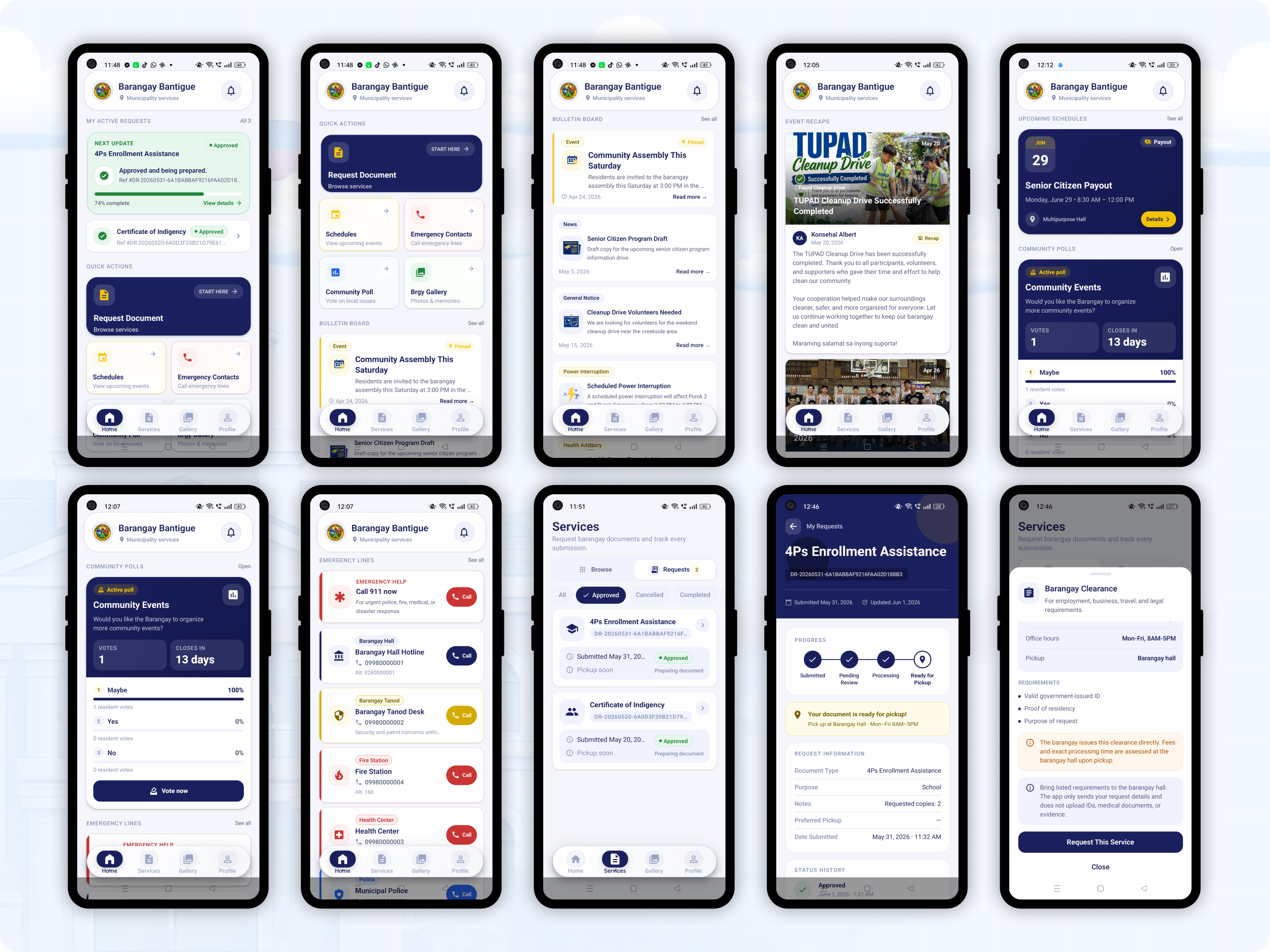
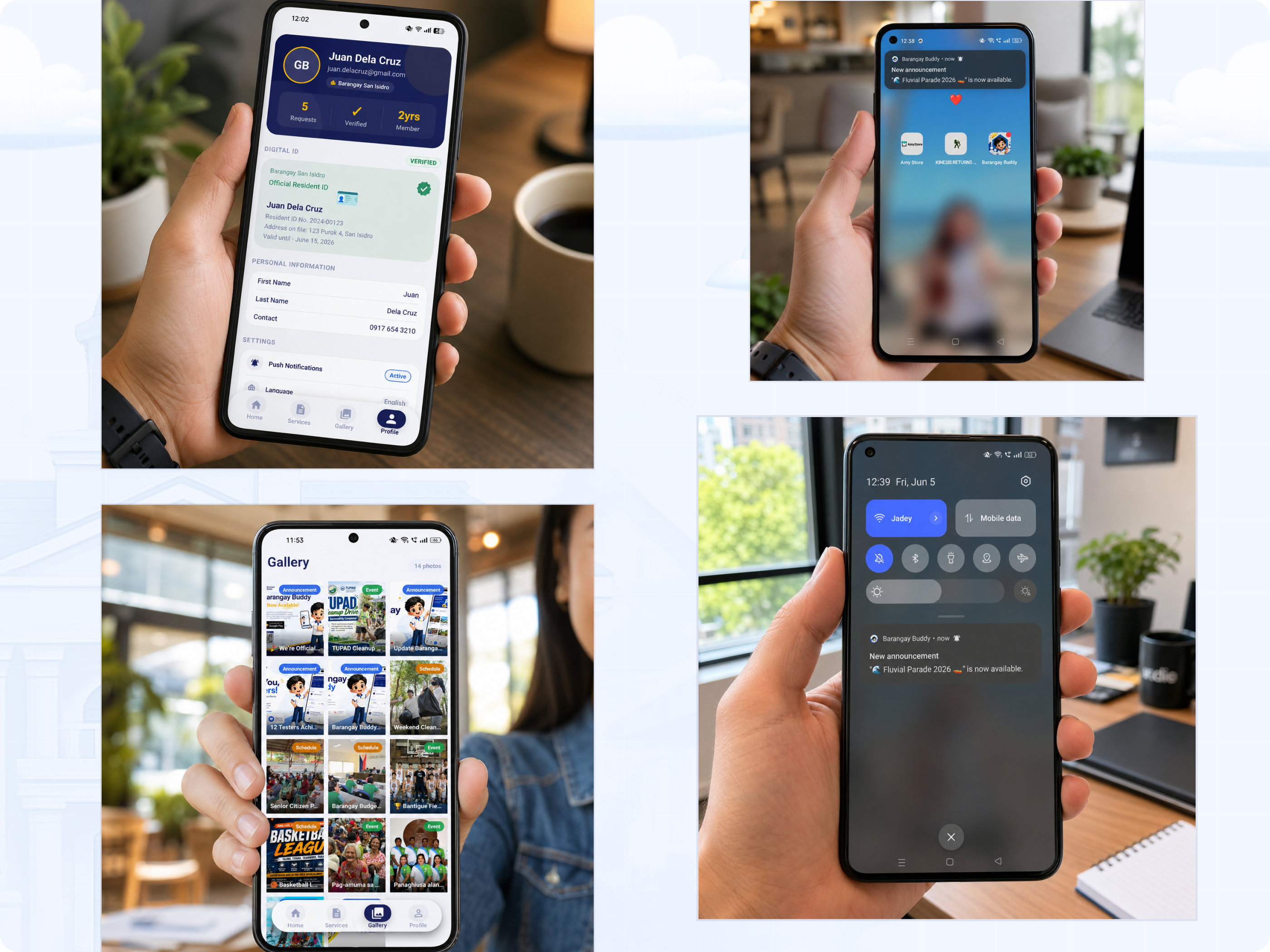
Barangay Buddy brings together the resident-facing mobile experience and the barangay admin portal into one connected service system. The screens below showcase how residents can access updates, requests, contacts, and community information, while barangay officials and staff manage content and services through the web admin interface.
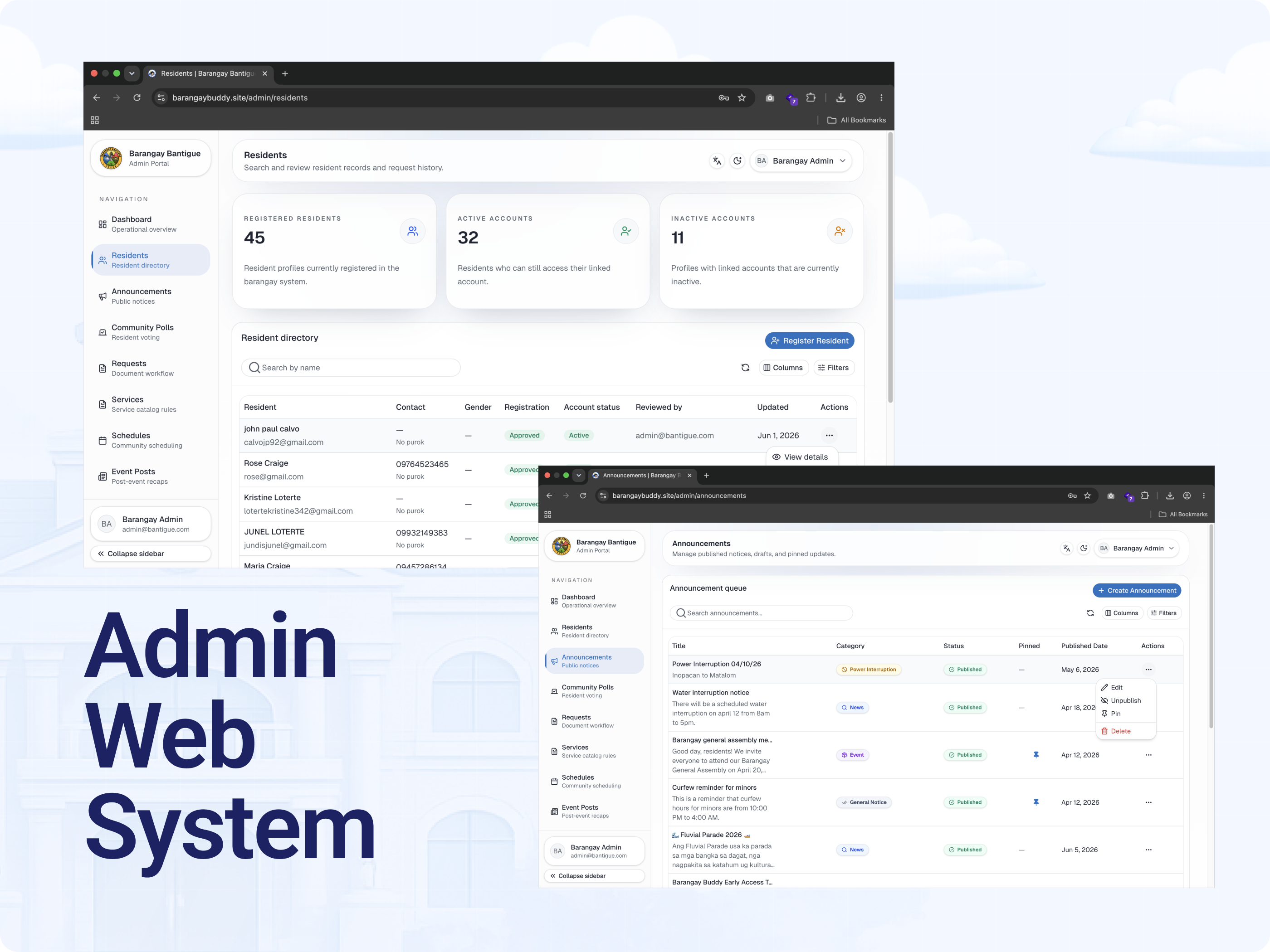
Checking if the experience is clear without extra explanation.
The usability review focused on whether users could understand the app’s purpose, identify key actions, and complete common tasks such as checking announcements, finding contacts, and submitting a request.
Clarity Check
Reviewed whether labels, section names, and feature cards were easy to understand.
Navigation Check
Checked if users could find the most important actions with minimal steps.
Improvements
Refined wording, grouped related features, and improved hierarchy for easier scanning.
A more organized and accessible barangay service experience.
The final experience connects the resident-facing Android app with the staff-facing admin portal, creating one flow for publishing updates, managing requests, and making public information easier to access. With the resident app available on Google Play, Barangay Buddy can be discovered and installed by Android users more easily.
For Residents
Updates, requests, contacts, events, polls, and resources become easier to access from one Android app available on Google Play.
For Barangay Officials & Staff
Announcements, requests, schedules, contacts, and resources become easier to manage from one portal.
For Barangays
Communication becomes more organized, public service feels more modern, and residents stay connected.
Barangay Buddy is more than a digital notice board. It is a practical service platform designed to reduce scattered communication, support faster updates, organize service requests, and create a friendlier experience for residents and barangay teams.